
The 2026 WordPress Security Landscape: What’s Actually Happening
The Scale of the Problem
WordPress core has matured significantly. The security team responds quickly to critical issues, and automatic background updates have closed many historical gaps. But the plugin ecosystem tells a different story.
In 2025 alone, the National Vulnerability Database recorded over 3,200 WordPress-related CVEs. 87% of those originated from third-party plugins . With more than 60,000 plugins in the official repository—and countless premium options—each one represents a potential weak point.
The statistics from recent scans are sobering. A 2026 analysis of business WordPress sites found that 80.4% had at least one detectable vulnerability, with one in three rated High or Critical Risk .
The Plugin Vulnerability Explosion
Plugin vulnerabilities are accelerating. Wordfence Intelligence reported a 24% increase in plugin vulnerabilities in Q1 2026 compared to the previous quarter. The weekly vulnerability reports often list dozens of affected plugins—from popular page builders to niche booking systems .
What makes this particularly dangerous is the exploitation timeline. Attackers now weaponize newly disclosed CVEs within 24 to 72 hours. Consider the WP2Shell vulnerability chain disclosed in July 2026: the Wordfence firewall blocked over 11 million exploit attempts targeting it . Attackers began probing for vulnerable sites the same day the vulnerability was disclosed.
| Threat Category | Prevalence/Risk | Primary Impact |
|---|---|---|
| Plugin CVEs | 87% of WordPress vulnerabilities | Varies; file upload and SQLi are most dangerous |
| Brute-force attacks | 9.1 billion attempts in Q1 2026 | Unauthorized admin access |
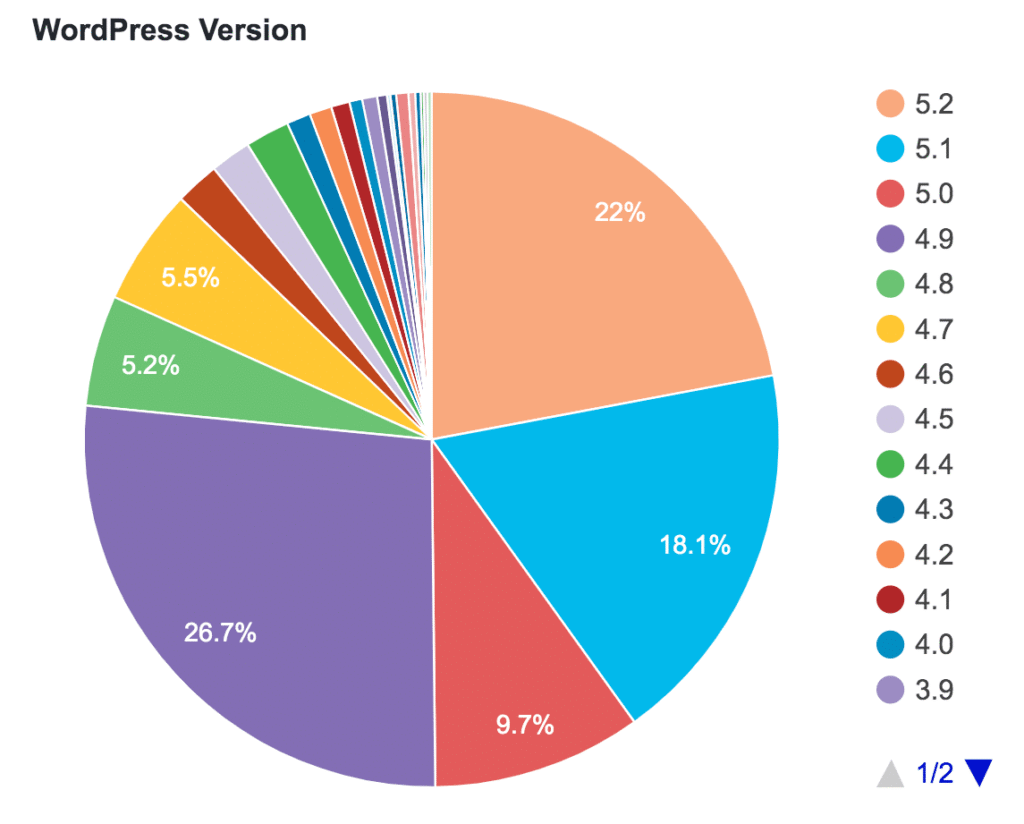
| Outdated core versions | 40.2% of sites | Known vulnerability exploitation |
| XML-RPC enabled | 35.8% of sites | Amplified brute-force efficiency |
| Author enumeration | 44.6% of sites | Username harvesting for attacks |
Beyond Plugins: The Attack Surfaces You’re Probably Ignoring
While plugin vulnerabilities dominate headlines, several other exposure vectors deserve equal attention.
XML-RPC: The Brute-Force Multiplier
XML-RPC was designed for remote publishing and mobile apps. Most modern sites don’t use it—but it remains enabled by default on many installations.
The problem is the system.multicall method. It allows attackers to bundle hundreds of credential attempts into a single HTTP request. That’s not a minor efficiency gain; it’s a brute-force amplifier.
The fix: Disable XML-RPC entirely unless you have a specific integration requiring it. For most sites, this costs nothing.
The Information Disclosure Problem
Attackers don’t need exploits if you hand them the blueprint. WordPress installations leak information through multiple channels:
- Generator meta tag reveals your exact WordPress version
- Author enumeration (?author=1) exposes valid usernames—44.6% of sites leave this open
- robots.txt often points attackers directly to wp-login.php—29.4% of sites expose this path
These aren’t vulnerabilities in the traditional sense. They’re configuration choices that make exploitation easier. Closing them is trivial.
The Supply Chain Blind Spot
Not every threat comes from your own negligence. In late 2024, a security plugin with over 900,000 active installations had its developer account compromised. A malicious version was pushed to the official repository and remained live for approximately 18 hours before detection .
This is the supply chain risk in the WordPress ecosystem. You can follow every best practice and still be exposed if a trusted vendor gets compromised.
Mitigation: Monitor security news for your critical plugins. Enable auto-updates only for plugins from highly reputable vendors with strong security track records.
Real-World Attack Breakdown: How a Magecart Attack Works
Understanding vulnerabilities in the abstract is one thing. Seeing a real attack unfold is another.
A cross-border WooCommerce site recently received customer complaints about stolen credit cards. The site owner checked the backend: orders were intact, no suspicious login records, everything looked normal.
The problem was hidden in the database. Deep in the wp_options table, a piece of heavily obfuscated JavaScript had been injected. It activated only on the /checkout/ page, silently capturing card numbers, CVVs, and expiration dates before submission and sending them to a server in Eastern Europe .
The entry point: A page builder plugin that hadn’t been updated in 18 months. It contained a stored XSS vulnerability with a public proof-of-concept exploit. The attacker needed no credentials—just the unpatched plugin .
This attack class is called Magecart. It originated targeting Magento e-commerce sites and has now spread widely into the WordPress/WooCommerce ecosystem. The cleanup required comparing file hashes across the entire installation, scanning database tables for injected scripts, and replacing all admin credentials and API keys .
The lesson: your checkout page is only as secure as your least-updated plugin.
Building a Defense That Actually Works
Layer 1: Maintenance Discipline
The single most effective security measure is also the most boring: keep everything updated.
- Enable automatic minor core updates
- Set a weekly review for plugin and theme updates
- Delete unused plugins and themes entirely—deactivated plugins still contain vulnerable code
- Remove abandoned plugins (those without updates in 12+ months)
Layer 2: Configuration Hardening
These measures reduce attack surface without breaking functionality:
| Hardening Measure | How to Implement |
|---|---|
| Remove version fingerprint | Filter the_generator action |
| Disable XML-RPC | Add filter or server rule |
| Block author enumeration | Redirect ?author= requests |
| Restrict login access | IP allowlist or custom login path |
| Add security headers | HSTS, CSP, X-Frame-Options |
| Disable file editing | Add define('DISALLOW_FILE_EDIT', true); to wp-config.php |
Layer 3: Authentication Strengthening
Password-based attacks remain devastatingly effective. The fixes are well-known but too often ignored:
- Unique passwords for every admin account
- Two-factor authentication on all administrator accounts
- Login rate limiting to block brute-force attempts
- Limit user permissions—not everyone needs Administrator access
Layer 4: Application-Aware Defense
Standard firewalls operate at the network layer. But most WordPress attacks arrive as legitimate HTTP requests—correct port, correct protocol, targeting real endpoints.
A WordPress-aware WAF understands plugin behavior and can catch exploitation attempts that network-layer defenses miss. The WP2Shell attacks blocked by Wordfence demonstrate this: the firewall rule stopped 11 million exploit attempts against a vulnerability that traditional firewalls might have missed .
Layer 5: Backup Hygiene
You cannot prevent every compromise. You can ensure recovery doesn’t become a catastrophe.
- Store backups offline—not on the same server
- Test restoration quarterly
- Verify backup integrity before you need it
Critical caveat: A backup you haven’t restored is a hypothesis, not a backup.
Tools and Resources Worth Your Attention
| Tool | Purpose | Notes |
|---|---|---|
| WPScan | Vulnerability database and scanner | 21,000+ known vulnerabilities, daily updates |
| Wordfence | Firewall, malware scanner, login security | Premium rules protect against emerging threats faster |
| Patchstack | Vulnerability database with CVSS scoring | Good for tracking specific plugin risks |
| Jetpack Protect | Free vulnerability scanning | Leverages WPScan database |
| UpdraftPlus / BackupBuddy | Backup solutions | Offsite storage essential |
Conclusion: Security Is a Practice, Not a Product
The data tells a consistent story. WordPress vulnerabilities overwhelmingly stem from neglected maintenance, not exotic attacks. Outdated core. Abandoned plugins. Default configurations never revisited.
The 80% vulnerability rate isn’t inevitable. It’s the predictable result of treating security as a one-time setup task rather than an ongoing process.
The 2026 threat landscape rewards preparation. Attackers move within hours of disclosure. Automated scanners never sleep. But the defenses that work are well-documented and accessible.
Start with the basics: update everything, delete what you don’t use, enable 2FA, and test your backups. Then layer on hardening and application-aware defense.
Your site received its first scan within 72 hours of launch. The question is whether you’ll be ready for the next one.
What’s your biggest WordPress security blind spot? Have you audited your plugin list recently? When did you last test a backup restoration?
Share your experience in the comments—or run a security scan today. The clock is always ticking.